How To Check CentOS Version?
When managing a VPS server, knowing your operating system version is an important first step before installing software or making configuration changes. Different CentOS versions may have different commands, package managers, and support options.
We will introduce you to two simple commands to check the current CentOS version quickly and easily.
1. First Step: Connecting to Your BlueVPS Server
Before writing any command, you should connect to your server using SSH access. We will explain how to do it using the example of the Linux operating system (Ubuntu/Debian/Linux Mint).
In order to connect to your VPS, you need the OpenSSH client program. In most Linux systems, the following program is already installed, but if you do not have one, you should install it.
First of all, open your Terminal application and write the following command: "sudo apt-get update". This command updates the list of available packages.
The next step is to run the "sudo apt-get install openssh-client" command, which installs the OpenSSH client.
After the SSH client is installed, you can connect to your VPS using the command: ssh -p port root@ip.add.re.ss.
The methods of connecting to your VPS can be different depending on your operating system. You can review the following guide and decide what suits you: https://my.bluevps.com/knowledgebase/6/Access-VPS-via-SSH.html.
2. Check CentOS Version Using the cat /etc/os-release Command
The cat /etc/os-release command provides information not only regarding the CentOS version, but also the name, version, and distribution details about the operating system.
After connecting to your server, write "cat /etc/os-release" in the command line. You will receive the following:
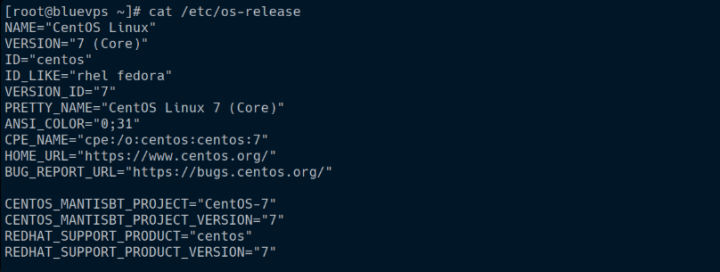
Information regarding your CentOS version can be found in the VERSION_ID and PRETTY_NAME lines.
3. Check CentOS Version Using the cat /etc/centos-release Command
The following command helps to find out the CentOS version. No additional information will be found using this command.
You can review the example in the screenshot.
