Why Low Latency VPS Is Crucial for Crypto Trading Bots and Algorithmic Trading
If you run crypto trading bots, build algo strategies in Python or Node.js, or plan to move from manual trading to automation, one variable quietly shapes your P&L more than your entries: latency. This guide explains where milliseconds disappear across the trade path, how a low latency VPS compresses them, and what "fast enough" looks like in 2025 across different strategy types.
What Is Latency in Crypto Trading, and Why Every Millisecond Counts
Put plainly, latency is the round-trip time between the matching engine publishing a tick and your order reaching it for execution. Traders call this the tick-to-trade cycle, and it is the truest measure of how competitive your setup actually is.
Top crypto market makers now operate inside single-digit milliseconds, so a bot sitting at 200 ms consistently arrives after the opportunity is gone. Total algorithmic trading latency also depends on WebSocket parsing, strategy logic, and order signing, not only network latency itself.
Latency vs. Slippage: How They're Connected
Slippage and latency look like separate problems, yet in live markets they are two symptoms of the same gap. When your order arrives late, the price you saw at signal has already moved. Faster markets widen that gap, and every extra millisecond lets other participants consume the liquidity you were targeting.
The Four Stages Where Latency Is Lost (Tick-to-Trade Breakdown)
Think of the trade path as four stages. Data ingress delivers the tick over WebSocket at 1 to 5 ms on a well-placed VPS, or 150+ ms from a retail connection overseas. Strategy logic runs at 1 to 10 ms in efficient Python or Node.js. Order generation signs the payload in 1 to 3 ms. Order transmission pushes it to the exchange gateway in another 1 to 5 ms when colocated.
The diagram below maps these four stages in sequence, with typical millisecond ranges at each step.
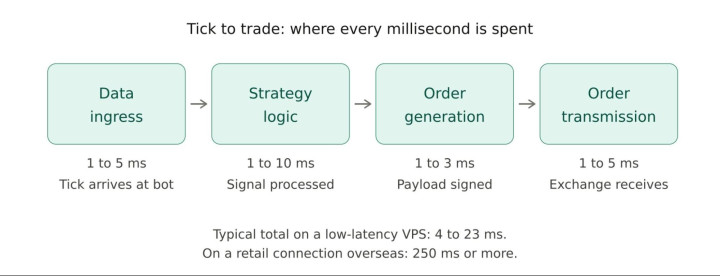
Notice where the biggest swings happen: ingress and transmission. Those two stages are fixed by where your server physically sits, which is exactly what a properly located VPS controls.
What "Good" Latency Looks Like in 2025: Benchmarks by Strategy
How fast is fast enough depends on what your bot does. High-frequency market making and cross-exchange arbitrage now need sub-10 ms round-trip. Statistical arbitrage and momentum strategies hold their edge under 50 ms. Mean-reversion scalping tolerates 50 to 150 ms. Grid and DCA bots run fine at 200 to 500 ms. Provision for your fastest strategy, and the rest follows.
How High Latency Silently Kills Your Trading Bot's Profitability
Most traders only inspect latency after a month of underwhelming results, assuming the strategy itself needs tuning. More often, the code is fine and the edge is real. What quietly drains the account is the crypto bot latency problem, an execution delay that converts good signals into mediocre fills, one order at a time.
Slippage: The Hidden Tax on Every Late Order
Slippage trading bot losses rarely show up as one catastrophic event. They accumulate across hundreds of fills per day, each a few ticks worse than intended. When your order reaches the book 100 ms after signal, the price between quote and execution has already widened, and aggressive entries pay the most. Over a month of active trading, this hidden tax often exceeds the fees you obsess over.
Missed Trades: When Your Bot Is Right but Too Slow
The second hit is invisible on your P&L yet painful in your logs: missed trades latency, the signals where your bot fires but the order never fills. Your limit sits just below the market, price touches your level, then reverses before the request lands. You see the setup play out exactly as predicted, although the fill never comes. Late orders become outright missed trades during fast moves, which is precisely when the largest gains live.
Outdated Market Data: Decisions Made on Yesterday's Prices
Latency corrupts not only your outputs but also your inputs. A slow WebSocket feed means your strategy is reading stale book depth, ghost spreads, and prices that no longer exist. You then compute a decision based on outdated market data, which effectively locks you into trading a market that moved on seconds ago. Your bot can be perfectly written and still systematically wrong, since its view of reality arrives late.
Real Numbers: What 100ms of Extra Latency Costs Per Month
Consider a bot executing 200 trades per day at an average size of $5,000. If 100 ms of extra execution delay adds just 0.05% slippage per fill, that is $2.50 lost per trade, or roughly $15,000 per month. Now layer in the missed fills on your best signals, and the question of why low latency matters in trading stops being theoretical. Latency is a P&L line item you pay every day.
Home PC vs. VPS: Why Running a Bot Locally Is Not an Option
The question of home PC vs VPS trading bot keeps resurfacing, usually from traders wanting to avoid a monthly subscription. On paper it sounds reasonable. In practice, three hard limits make local execution unworkable for anything more serious than a paper-trading experiment.
The Home Internet Problem: 150–300ms Is Already Too Slow
Your 1 Gbps fiber line looks impressive on a speed test, although speed and latency are different animals. A typical 150ms home connection to Binance or OKX from Europe or North America is the norm, not an outlier. Consumer ISPs route packets through multiple hops optimized for streaming rather than microseconds, and a busy Zoom call or a teenager gaming on the same network will spike your round-trip into the danger zone precisely when the market is most volatile.
Uptime and Reliability: Trading Bots Need to Run 24/7
A VPS trading bot 24/7 uptime expectation is not a luxury feature, it is the baseline. Your bot needs to be online through overnight moves, weekend liquidations, and the exact hour your neighborhood experiences a power outage or your provider runs ISP downtime maintenance. Typical home setups achieve roughly 95% availability, which sounds acceptable until you realize it translates to thirty-six hours of offline time per month. Professional infrastructure offers an uptime SLA of 99.99%, meaning under five minutes.
Side-by-Side Comparison: Home Setup vs. Low-Latency VPS
The table below compares both setups on the factors that actually move your P&L: latency, uptime, location control, hardware, cost, continuous operation, and DDoS protection. If you are still on the fence about why use VPS for trading bot deployment, these numbers make the case more clearly than any argument.
|
Factor |
Home PC |
Low-latency VPS |
|
Latency to exchange |
150 to 300 ms |
Under 2 ms |
|
Uptime |
~95% (up to 36 hrs offline per month) |
99.99% SLA (under 5 min per month) |
|
Location control |
None, fixed to your city |
Region chosen next to the exchange |
|
Hardware |
Shared with daily personal use |
Dedicated CPU, NVMe SSD, ECC RAM |
|
Cost |
"Free", but paid in trading losses |
$10 to $50 per month |
|
24/7 operation |
Interrupted by reboots and outages |
Continuous and unattended |
|
DDoS protection |
None |
Included at network level |
How a Low-Latency VPS Solves the Problem
Once you accept that latency is the constraint, the solution becomes a question of infrastructure rather than code. A low latency VPS crypto trading setup addresses the problem on four fronts simultaneously, and each one maps directly to a stage of the tick-to-trade pipeline we mapped earlier.
Physical Proximity to Exchange Servers: The #1 Factor
The single largest variable is data center proximity to the matching engine. Binance operates primarily out of AWS Tokyo (ap-northeast-1), Bybit runs from AWS Singapore, and OKX concentrates in AWS Hong Kong. A VPS in the same region cuts your round-trip from 150 ms to under 2 ms, which is not an optimization but a phase change. You are no longer compensating for distance, you are eliminating it. Everything else you can tune sits inside that saved window.
Dedicated Resources vs. Shared Hosting: Why It Matters for Bots
Cheap VPS plans advertise impressive specs, though they run on oversubscribed hardware where the noisy neighbor effect is constant. A CPU-heavy tenant on the same host can freeze your strategy at the worst moment. For trading, you need a dedicated CPU core, guaranteed RAM, and no memory ballooning, provisioned like a production server.
Network Infrastructure: Fiber Cross-Connects and Direct Peering
Proximity helps only when the network path is clean. Premium providers run a fiber cross-connect inside the same data center to the exchange's rack, so packets travel meters rather than the public internet. Direct peering with major carriers removes further hops, producing a low latency trading server with ingress and transmission under 1 ms.
Hardware That Matters for Trading Bots (CPU, RAM, NVMe)
AMD EPYC processors deliver the clock speeds and branch prediction that latency-sensitive Python and Node.js event loops need. NVMe SSD storage removes the I/O stalls SATA drives introduce during logging and backtesting. Sixteen to thirty-two GB of RAM handles most bots, while multi-pair strategies benefit from more. Pair these correctly and hardware stops being a bottleneck.
VPS Location Strategy: Where to Host Your Crypto Bot
Once you are ready to deploy, the first infrastructure decision is also the most consequential: where your server physically sits. A VPS for Binance trading bot that runs from Frankfurt will underperform the same code in Tokyo by a factor of twenty, regardless of how you tune it.
Major Crypto Exchange Data Centers and Their Locations
Each major exchange runs its matching engine from a specific cloud region, and the best server location for Binance bot deployment is not automatically right for other venues. The table below maps each exchange to its primary data center, the recommended VPS region, and realistic latency figures from a properly located host.
|
Exchange |
Primary matching engine |
Recommended VPS region |
Typical latency |
|
Binance |
AWS Tokyo (ap-northeast-1) |
Tokyo or Singapore |
3 to 8 ms |
|
Bybit |
AWS Singapore (ap-southeast-1) |
Singapore |
1 to 3 ms |
|
OKX |
AWS Hong Kong (ap-east-1) |
Hong Kong or Singapore |
2 to 6 ms |
|
Coinbase |
AWS US East (us-east-1) |
Ashburn or New York |
1 to 5 ms |
|
Kraken |
AWS US East, London |
Ashburn or London |
3 to 10 ms |
Matching Your Bot's Strategy to the Right Region
If you run one bot on one exchange, put the VPS in the same region. The harder case is a portfolio spanning Binance, Bybit, and OKX, where you pick one compromise host. Singapore is the common answer, since trading VPS Singapore deployments sit close to Bybit and OKX natively and add only a few milliseconds to Binance Asia routes. For volume weighted to one venue, colocate there and accept the hop on the rest.
Latency by Region: Binance, Bybit, OKX, Coinbase, Where Are They?
Binance runs its primary matching out of AWS Tokyo (ap-northeast-1), so a VPS for Binance trading bot performs best from Tokyo or Singapore. Bybit clusters in Singapore and OKX in Hong Kong, making a VPS for Bybit trading bot a simple call: Singapore. Coinbase and Kraken operate from US East near Ashburn, so a Frankfurt or London VPS adds roughly 80 ms you do not want. Pick your primary venue, then anchor your VPS to it.
Latency by Trading Strategy: How Much Speed Do You Actually Need?
Not every bot needs microseconds. The right server spec is the one that keeps up with your shortest decision window, no faster. HFT-grade infrastructure for a DCA bot wastes money, and a scalper on shared hosting wastes opportunity. Match the hardware to the workload.
Scalping and High-Frequency Bots: Sub-1ms Is Non-Negotiable
Scalping and high-frequency trading bots compete inside a sub-1 ms band. At this tier, an HFT bot VPS requires colocation inside the exchange data center, a dedicated CPU core with pinned affinity, and kernel-bypass networking where available. Anything slower loses to competitors pinging the same matching engine from the rack next door. If you are serious about latency arbitrage or market structure scalping, assume every millisecond beyond single digits is a structural disadvantage you cannot code around.
Arbitrage Bots: When 50ms Is Already Too Late
Cross-exchange arbitrage sounds obvious in theory, the same asset trading at different prices on two venues, though in practice the window closes inside 50 ms. A crypto arbitrage bot VPS needs low latency to both legs simultaneously, which usually means two VPS instances in different regions with a fast connection between them, or one VPS in Singapore straddling Bybit and OKX. If you can see the spread on your screen, it is already being taken.
Market-Making Bots: Why Stale Quotes Get You Picked Off
Market makers quote both sides and earn the spread, which means your quotes must refresh faster than the market can move against you. Miss the refresh and traders pick you off at stale prices, a scenario known as adverse selection. Market making bot latency VPS requirements start at roughly 10 ms, and premium providers push under 5 ms. On top of that, sustained throughput matters, since you are sending and canceling hundreds of orders per minute.
Swing and Trend-Following Bots: Does Latency Even Matter?
Not every strategy cares. Swing, trend-following, and DCA bots operate on timescales of hours or days, where 500 ms is indistinguishable from 5 ms to your P&L. Grid trading bot server requirements fall in a similar band, tolerating 200 ms comfortably. Pay for uptime and stability rather than raw speed here. A reliable $15 VPS serves a grid or DCA bot better than the fastest box in the region.
WebSocket vs. REST API: Choosing the Right Connection for Your Bot
The WebSocket vs REST API trading bot choice sounds technical, though the impact lands directly in your execution speed crypto bot numbers. One protocol asks the server every time; the other keeps a pipe open and listens. The gap can exceed 100 ms per tick.
python

# REST API: one request per update (slow)

import requests

response = requests.get("https://api.binance.com/api/v3/ticker/price?symbol=BTCUSDT")

# WebSocket: persistent real-time stream (fast)

import websocket

ws = websocket.WebSocketApp("wss://stream.binance.com:9443/ws/btcusdt@trade")
REST API Latency: Good for Orders, Bad for Market Data
Every REST call opens a TCP connection, handshakes TLS, sends, waits, closes. Round-trip runs 50 to 150 ms at best. Binance API latency on REST sits at 100 to 300 ms from most regions, which is fine for placing orders but disastrous for polling market data. REST also carries tight API rate limits that break under load.
WebSocket: Why Real-Time Streaming Changes Everything
A WebSocket connection stays open. Once the handshake completes, the exchange pushes every tick, trade, and book update as they happen, with no per-message TCP overhead. Your bot receives a real-time data feed with sub-10 ms delay on a well-located VPS. For scalping or market making, WebSocket is the only viable market data stream.
Which Exchanges Support WebSocket and What Speeds to Expect
Every major venue supports WebSocket feeds: Binance, Bybit, OKX, Coinbase, Kraken, with streams covering trades, book depth, and account events. Bybit and OKX deliver sub-10 ms push on Asia-hosted VPS, while Binance sits at 3 to 8 ms from Tokyo. Freqtrade and Hummingbot default to WebSocket for market data and REST for order routing, the correct split. FIX API is available on Coinbase and Kraken Pro.
How to Measure and Test Your VPS Latency
You cannot optimize what you do not measure. A proper VPS latency test ping exchange routine takes two minutes and tells you whether your host is delivering on its promises or quietly costing you basis points.
Tools to Measure Round-Trip Time to Your Exchange
bash# Ping Binance API (example from Singapore VPS)

ping api.binance.com

# Traceroute for network path diagnostics

traceroute api.binance.com

# Curl with response time measurement

curl -o /dev/null -s -w "Time: %{time_total}s\n" \

https://api.binance.com/api/v3/ping
Run these three commands on every VPS you evaluate. Most premium providers also expose a Looking Glass page for external testing before you purchase.
What Ping, Traceroute, and Jitter Actually Tell You
Ping reports round-trip time to the exchange gateway, the first number that matters. Traceroute shows each hop between your VPS and the destination, revealing where delay or packet loss enters the path. Jitter measures the variation between pings; a low average with high jitter is worse than a slightly higher but stable baseline.
Setting a Latency Baseline and Spotting Regressions
Record your ping, jitter, and curl timings hourly for a week after deployment. This becomes your latency baseline. Anything drifting 20 percent above it signals a routing change or provider issue worth a ticket. How much latency is acceptable crypto bot decisions depend on this number holding steady under load, not just looking good at 3 a.m.
Beyond Latency: Other VPS Factors That Affect Bot Performance
Latency gets the attention, though three factors decide whether your bot stays alive. Skip any and a fast VPS still loses money.
Uptime SLA: What 99.9% vs 99.99% Means in Practice
A 99.9% trading VPS uptime guarantee permits nearly nine hours of downtime per year, most of it during market events. A 99.99% uptime SLA caps the same figure at under one hour. For VPS trading bot 24/7 operation, the extra nine matters more than the price gap.
DDoS Protection: Keeping Your Bot Online During Attacks
VPS DDoS protection crypto trading is not optional in 2025. Retail hosts collapse under volumetric attacks aimed at neighbors on the same subnet. Professional providers absorb traffic at the edge. Combine that with IP whitelisting on your API keys and a firewall for full API key security.
Auto-Restart and Monitoring: Surviving Crashes Without You
ini# systemd unit for automatic bot restart

[Unit]

Description=Crypto Trading Bot

After=network.target

[Service]

ExecStart=/usr/bin/python3 /home/trader/bot/main.py

Restart=always

RestartSec=5

[Install]

WantedBy=multi-user.target
A systemd unit brings the bot back in five seconds after any crash. Pair it with a redundant network and basic monitoring for an auto-restart setup that runs without you.
Delivering both sections.
The ROI of a Low-Latency VPS for Crypto Traders
The cheapest infrastructure is rarely the cheapest outcome. A low-latency VPS looks like an added expense on paper, though the slippage savings from active strategies usually cover the monthly cost many times over. The ROI math is simpler than most traders expect.
VPS Cost vs. Slippage Savings: Running the Numbers
Run the numbers your own way. A trader executing 100 fills per day at $1,000 average size, losing 0.03% slippage to poor routing, bleeds $900 per month. The same trader on a Singapore VPS cuts that to 0.01%, saving $600 monthly. Against a $30 VPS for trading bots cost, the crypto bot VPS ROI calculation is barely a calculation at all.
When a $30/Month VPS Pays for Itself in Week One
For active scalping or arbitrage strategies, the pip savings across fast moves often pay for the server on day one. A single aggressive entry that fills three ticks better than it would from your home PC vs VPS trading bot setup can cover the whole month outright. The heavier your trade volume, the faster the break-even point arrives, which is why aggressive traders upgrade first.
Break-Even Analysis by Trade Volume and Strategy Type
For DCA and grid bots below $5,000 in daily volume, the ROI comes from uptime rather than raw speed, though the math still works. For scalpers and market makers clearing $50,000 daily, the break-even analysis collapses to hours, not weeks. The one setup where a VPS does not pay for itself is a dormant bot that rarely trades at all.
Frequently Asked Questions
Does latency matter for long-term crypto bots?
For swing or DCA bots operating on daily candles, latency barely moves the needle. Uptime and reliable WebSocket reconnection matter far more. Anything below 500 ms is fine for these strategies.
What ping to my exchange should I aim for?
Target sub-10 ms for scalping and arbitrage, under 50 ms for momentum strategies, and under 200 ms for grid or DCA bots. Measure with ping and curl before committing.
Can I run multiple bots on one VPS?
Yes, provided CPU and RAM headroom permit. Most 4-core VPS plans handle three to five bots comfortably. Separate them into individual systemd services so a crash in one does not affect the others.
Is a VPS better than a cloud server for trading?
A dedicated low-latency VPS typically beats a generic cloud instance, since cloud regions target general workloads rather than proximity to matching engines. Cloud works only when its region sits next to your exchange.
Which location is best for Binance / Bybit / OKX bots?
Binance runs from AWS Tokyo, so Tokyo or Singapore is optimal. Bybit and OKX are best served from Singapore and Hong Kong respectively. For mixed portfolios, a Singapore VPS covers all three with minimal penalty.
Conclusion
So, where does your bot actually lose money right now, in the strategy or in the wires it runs on? For anyone trading more than a handful of times per day, the honest answer is almost always the second one. Across every section we covered, from slippage and missed fills to WebSocket streams, exchange geography, and uptime guarantees, the same principle holds: your infrastructure decides how much of your strategy survives contact with live markets. A home PC cannot compete with a properly provisioned server sitting next to the matching engine, and the monthly cost gap is trivial next to the slippage it recovers.
If you are ready to put a low latency VPS crypto trading bots setup behind your strategy, review the dedicated trader plans at BlueVPS. Pick the region closest to your exchange, run the latency tests from earlier in this guide, and watch the edge you already built finally show up on your P&L.
Blog